- AE Golf Performance Newsletter
- Posts
- New Launch Monitor Tool
New Launch Monitor Tool
Version 1 of a Tool to Help Use Launch Monitor Data

Alex Ehlert
February 03, 2026

The Launch Monitor Analysis Tool
Launch monitors are now much more readily accessible and used within the day-to-day practice of many coaches and golfers. They have also helped clarify our understanding of how to create different shot shapes and outcomes.
While information about modern impact and ball flight laws is now readily available, it’s still important to be able to leverage launch monitor data effectively and efficiently.
I have started building out a “Golf Science Toolkit” designed to help coaches and golfers better leverage golf data/insights across multiple areas (fitness/S&C, launch monitors, biomechanics tools, etc.). Some are meant for general usage, while others are custom builds that I create for coaches, golfers, or facilities (let me know if you’re interested and we can have a chat).
Today I want to focus on the basic features from a new launch monitor tool. You first upload export files from different launch monitors, and it automatically parses out key information, analyzes the data, and presents it in different ways.
This version shows just a sneak peak version of a single page focused on three key factors:
Club Delivery: club path, face angle, and face-to-path variables which contribute to both the start line and curvature of the golf shot.
Club Face Impact Location (if/when available), which contributes to many aspects of ball flight. Other visuals/methods are used to help understand if strike could be a concern when direct face impact data isn’t available.
Shot Outcomes and ball flights that result from the club delivery and face impact variables.
But let’s start with a simple overview of these factors for those that are not familiar.
Club Delivery, Strike, and Ball Flight
The goal of the swing is to deliver the club head into impact with the ball in a way that will create a desired ball flight and shot outcome. There are many variables we can quantify during that key impact period. Some are related to the speed, orientation, or path of the club head, while others focus on initial launch characteristics of the golf ball.
For now, let’s focus on a key factors showcased in this basic version of the launch monitor tool.
Club Path: the direction the club head is moving relative to the target line at impact. Positive values are generally in-to-out, negative values out-to-in, and zero means path is right at the target.
Face Angle: the direction the face of the club is facing at impact (how open or closed is the face?). A positive value means the face is open relative to the target, negative means it is closed, and zero means the face is right at the target.
Face Impact Location: Some launch monitors (like GC Quad) can quantify where on the club face the ball is struck. This is presented in both the toe-heel direction and high-low direction in mm. The result is we can create a grid, where 0,0 is the center of the club face, the x-axis is distance from the center in the toe or heel direction and the y-axis is distance from the center in the vertical direction.
How do these factors affect ball flight? Here’s a simple breakdown:
Assuming a solid strike and all other factors constant: the initial launch direction is ~75-80% determined by face angle (exact % depends on the club), with the path having a smaller effect. We generally expect the ball to start between the face angle and club path, but closer to the face angle.
The curvature of the golf ball is affected by the relationship between the face angle and club path (face-to-path). If the face is open relative to the path, the ball tends to fade. If the face is closed relative to the path, it tends to draw.
But we can’t assume that we’ll always strike it right in the center of the club face in the real-world. Strike quality influences the distance, direction, curvature, and trajectory of golf shots, and varies shot-to-golf and between golfers.
Strikes off the toe tend to promote a push-draw ball flight, while shots off the heel promote a pull-fade (particularly with drivers, since they have a more pronounced gear effect - a topic for another post).
Strikes towards the bottom of the face tend to launch lower and with more spin. Strikes higher on the face tend to launch higher and with less spin.
Off-center shots also have less efficient transfer of energy into the ball (less ball speed for a given club head speed). Though modern drivers are not always optimized at the exact 0,0 center point (you often get a nice combination of speed, launch, and spin with a strike just above center and perhaps a touch towards the toe).
The influence of face impact location and strike quality can be challenging to navigate if you’re just learning impact and ball flight laws. Because even if you deliver the club with a face angle and club path that should produce a specific ball flight, an off-center strike can either amplify or neutralize that flight.
And importantly, the ability to consistently strike the center of the face differs across skill levels AND individual golfers often exhibit a pattern or bias. For some examples, check out this recent post below.

For this reason, I am also working on tools for those that do not have access to a GC Quad or other high-end tech with face impact measurements.
This was a pretty simple breakdown of impact and ball flight laws, but should do for now. If you want a more detailed breakdown in the future, let me know.
The Tool
Here’s a quick video overview of the launch monitor tool and how it works.
Here are a few key features in this basic version:
Upload export files from launch monitors, and it will parse out key information, prep the data for analysis and exploration, and calculate some key variables and statistics.
Option to view visuals of the ball flights, based on data from each shot.
Can compare between clubs or explore across specific clubs (depending what data is available in the uploaded file).
Select a specific shot, and it will be highlighted across all visuals. This allows you to both look across multiple shots for trends/patterns and explore what happened during individual shots.
The table shows a full array of metrics for further context/exploration. You have the option to show just a subset of metrics or a full array.
Future features will allow for deeper and different analyses and visualizations of the data based on specific uses of launch monitors.
Let’s go through a few examples from a dataset of 20 driver swings. Keep in mind that I’m showing screenshots of just the visuals, but there’s also a table at the bottom that allows me to see the full array of metrics to provide additional context to each shot and the patterns as a whole (e.g., clubhead speed, ball speed, launch angle, spin rate, etc.).
Overall Pattern (all 20 shots)
First, I like to look at the overall patterns and trends across multiple swings.
Let’s start with the actual shot dispersion patterns and ball flights. This golfer tends to have two primary ball flight patterns: About half the shots peel off to the left, the other half to the right. There are then a handful of “big misses”, including a weak push fade/slice and a big pull hook.
We can start to understand these patterns by looking at the club delivery patterns (top left chart). Club path (blue) is consistently about 3 degrees out-to-in. Face angle (orange) then varies from >5 degrees closed to about square. For this reason, face-to-path (green) varies from about -3 to +3 on most shots. Without considering strike (yet), here are a few things I’d expect based on this club delivery pattern. On shots where the face angle is fairly neutral, the ball starts just left of the target and may fade back a bit. But on shots where the face stays shut, the ball will start slightly more to the left and either stay there or curve further left.
The strike data (top right) shows a fairly compact pattern for an amateur player, with a tendency to strike at or just above the center line. But there are a few mis-hits in there, including one low and off the heel (we’ll get to this soon).
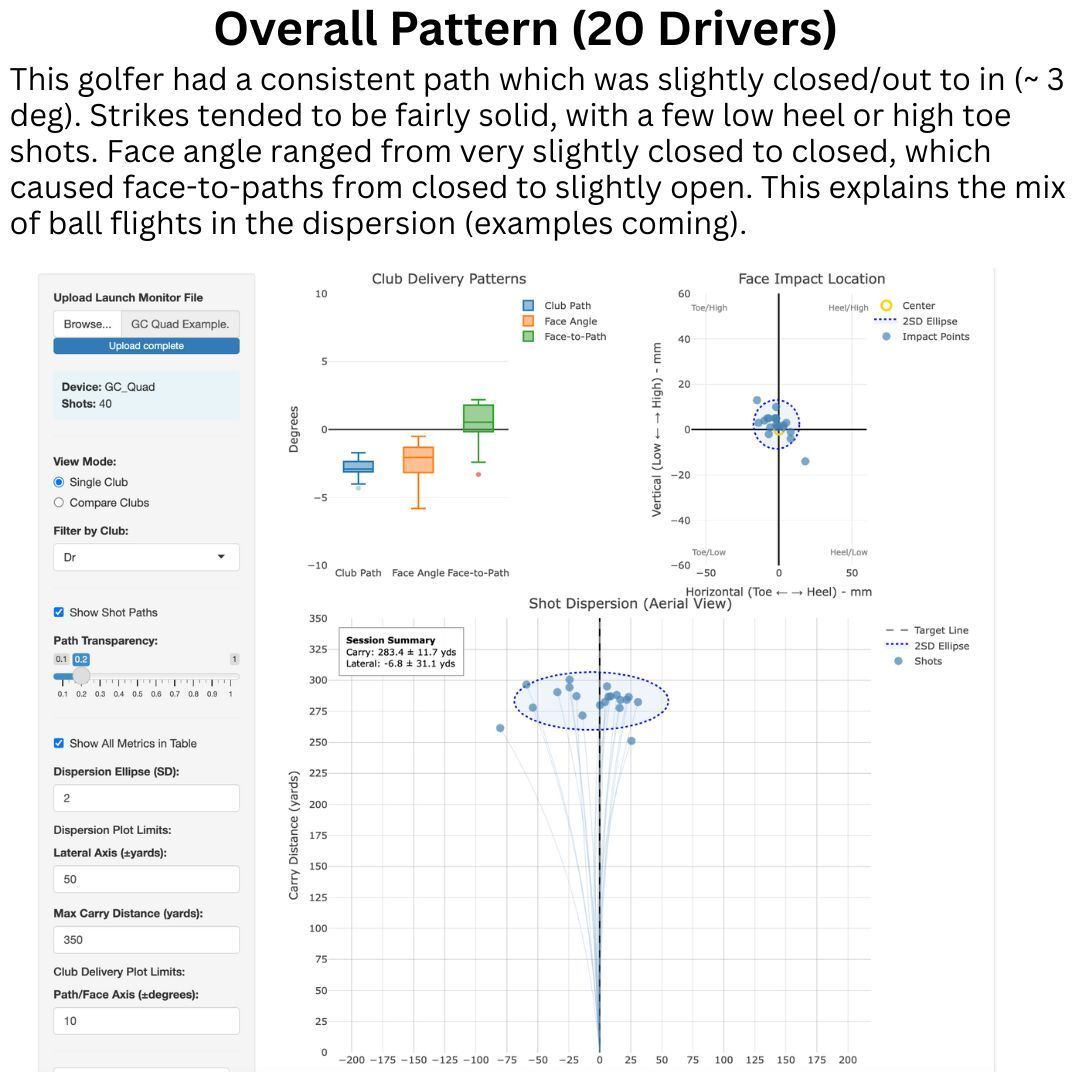
Alright, let’s now dive into some individual shots and show how this plays out.
Shot Example 1: Miss-Hit Cut

First, we have that ball that ended up short and right of the rest of the pattern. What happened there? The club delivery suggests a nice pull-fade pattern (slightly closed path, fairly neutral face angle). But the strike was very low and off the heel. This will amplify the fade curvature AND drastically affect distance. A great example here of why considering strike is important.
Shot Example 2: Pull Hook
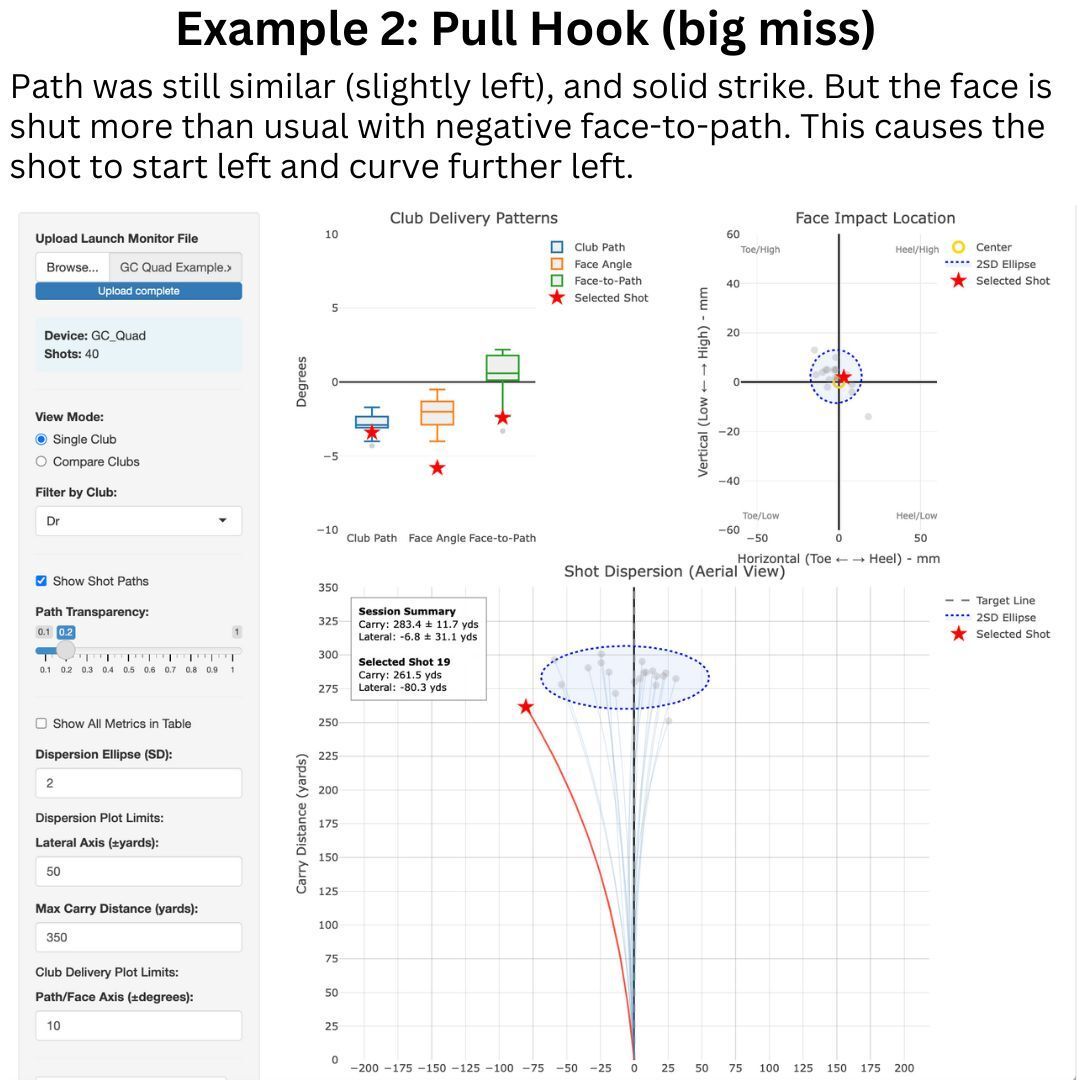
Let’s go to the other big miss in the pattern, which happened in the other direction (big hook about 80 yards left). The face strike is much more centered than the last one. But in this case, the face was very shut. So instead of curving back to the right, the ball started left and went further left. Not a good combo.
Shot Example 3: Quality Pull Fade

Enough with the negative shots, let’s find an example of a quality shot. This shot starts just left of the target and fades back to within ~7 yards of the target line with 287 yard carry. A great shot, and likely what this golfer would like every single time off the tee. Path stays consistent, face angle is slightly less closed (creating a positive face-to-path). The strike wasn’t too bad, but a touch off the heel. This may be why the ball curved back to the right of the target line. But overall, a nice shot.
Shot Examples 4 and 5: The Two “Typical” Shots
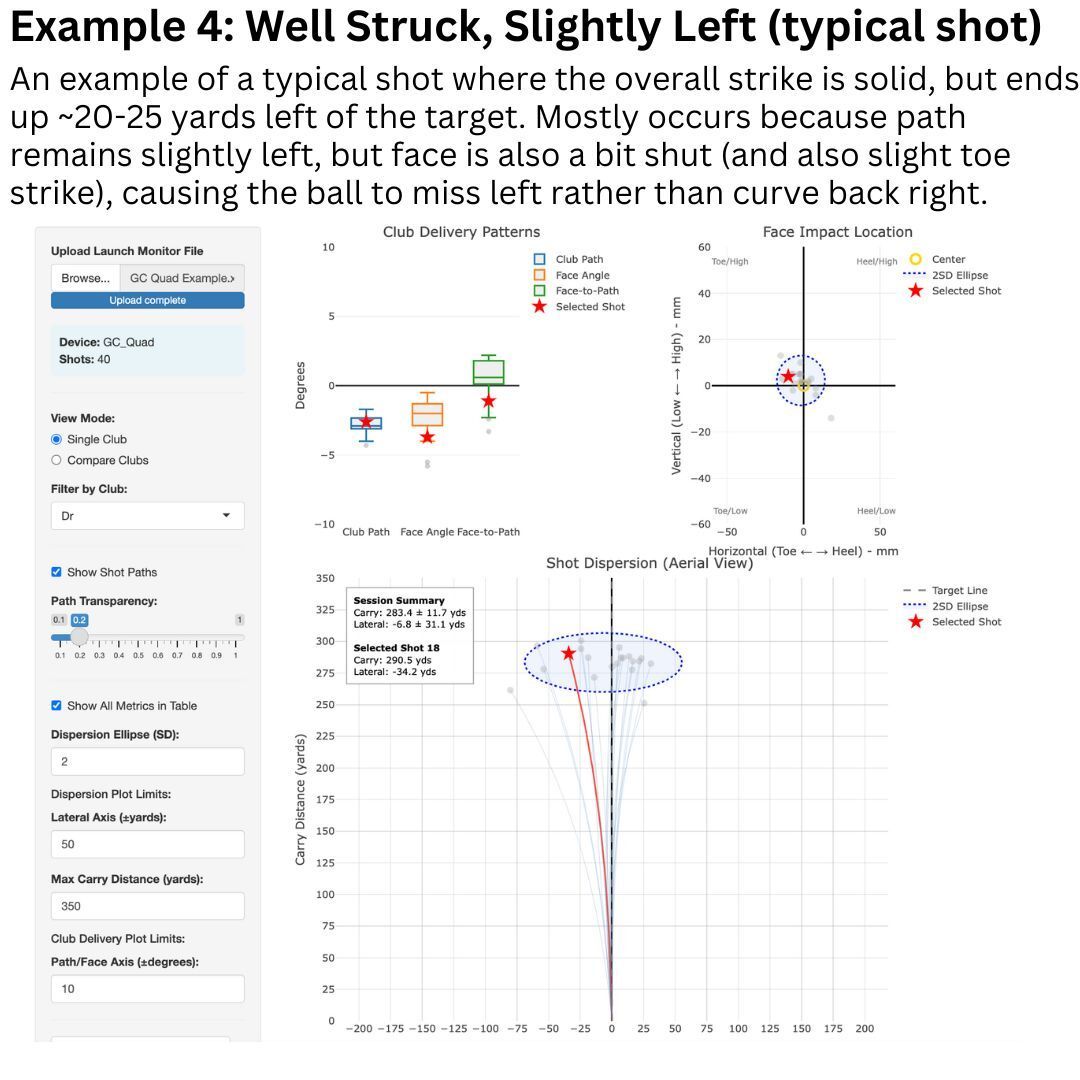
Let’s look at the two typical shot patterns (just left and just right).
This first one ends up ~24 yards left of the target with good distance (290 yard carry). Path again is a bit out-to-in. But the face is just a touch closed relative to that path, promoting a draw curvature. The strike is also a bit off the toe, which I’d expect to add a bit of draw curve to the flight. The result, an overall quality strike that ends up a bit left of the target.
Let’s see the other “typical shot” we see in this data. This one basically a mirror of the slight left ball.

In this case, the ball ends up ~22 yards right of the target, but again with decent distance. The strike is good on this one. But what we see is a fade that’s pretty neutral, creating a fairly positive face-to-path.
Summary
As mentioned before, this is just the start for this tool. I will be building additional features in, to help better explore and leverage this type of data. But already it provides a useful snapshot of key variables which can be used to help understand a golfer’s overall pattern and what happens during individual shots.
If there are features that you would find useful within a tool such as this (or you have ideas for a different tool altogether), then let me know using the feedback form link below!
WHILE YOU’RE HERE
SUBMIT REQUESTS, QUESTIONS, OR FEEDBACK
If you want to work with me, have questions, or recommendations for future content, follow the link below and submit a response. This link will be available on every issue of the newsletter, so you will have opportunities to do this in the future as well!